
Cisco Router Console Connection giving garbage
If you are connecting console cable on Cisco Router and on your terminal window are giving garbage or not human readable output
with below Connection setting .

Cisco Router Console Connection giving garbage
If you are connecting console cable on Cisco Router and on your terminal window are giving garbage or not human readable output
with below Connection setting .
Cisco UCS Networking Best Practices by Brad Hedlund
This presentation assumes familiarity with basic networking and server VNIC concepts in UCS, and familiarity with virtual port channels.
This version of the presentation (v2.5) focuses primarily on the Ethernet uplinks. SAN uplinks and VMware networking scenarios are briefly discussed but not covered extensively. Those topics and others such as QoS, the Cisco VIC, and vNIC fabric failover may be included in future versions of this presentation.
Part 1 – Cisco UCS Networking Overview
How to troubleshoot CallerID issues on a FXO
The Digium® X100M FXO module and X400M FXO module are daughter cards that allow Digium® analog cards to terminate analog telephone lines (POTS).
This document is intended to be a brief description of toublehsooting steps that Digium’s customers can take to resolve Caller ID issues on their Asterisk Server.
Requirements
At least one analog line.
A regular analog phone with Caller ID display feature
Fully configured Asterisk server with the latest version of DAHDI and Asterisk
Troubleshooting Steps
A Caller ID issue could be caused by several factors. This section explores the possibility that the issue could be located at the telco or by noise on the lines.
Connect an analog phone to the demarcation point. In telephony, the demarcation point is the point at which the telephone company network ends and connects with the wiring at the customer premises.
Place a call — using another line or mobile phone — from the PSTN to the analog phone connected at the demarcation point and check if the phone displays Caller ID. If the Caller ID information is not being shown by the phone, please contact your telco and ask them how to enable this feature.
Otherwise, please disconnect the phone and plug it to the line that is directly connected or closest to your Asterisk server and repeat the test call.
Continue reading
How to change VCenter Server 5.5 Appliance IP address CLI
Execute the following command
/opt/vmware/share/vami/vami_config_net
Now you will get the option to change the network setting.
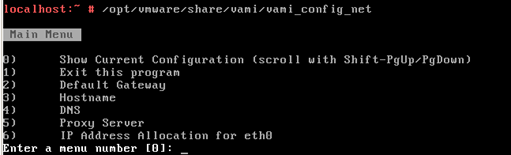 Now you can access your server with url https://server_ip_address:5480
CCIE RS LAB config mistake BGP neighbor not coming up
While I was configuring BGP neighbors it was not coming up .
What I did mistake
How to check tftp events in Elastix
you can check tftp events requested by Cisco Phones by the following command .
tail -f /var/log/messages
this is show you the request and response by served by tftp server on Elastix .
Elastix OpenVPN Configuration
I have taken a scenario of Elastix PBX install on two geographical location connecting over OpenVpn
and working as a VPN server and client. As we want to use OPENVPN for data and voice connectivity for both offices.

All our Internet traffic should go out through DSL Routers and only Voice and data traffic 192.168.1.x and 192.168.200.x should go over VPN Tunnel for KU to IN and IN to KU offices. Continue reading
Cisco UCS KVM The Virtual Media program will close
I was trying to mount ISO image on Cisco UCS KVM ,when I clicked on Virtual Media tab I got the following Error .
I googled it and got solution remove all the java version and install 32 bit java .I tried lower version of java . Java version 7 update 25 (jre-7u25-windows-i586) worked for me . I was able to map the iso images .I was using UCS version 2.1 (3a).
Backup VOS3000 CDR database
CDR data maybe very large, about 73G/year/1000cc
the backup is slowly,vos3000 user should depend this by yourself
There are two methods to do this
1)You should stop mbx3000d,vos3000d,mysql services before taking backup
/bin/tar -jcvf /home/kunshi/vos3000/databackup/vos3000cdr.tar.bz2 e_cdr_* /var/lib/mysql/vos3000/
VOS3000 Switch Firewall rules
If you are running you VOS3000 server behind the firewall then you need to allow the following ports on your firewall.
tcp port:
vos-client: 1202
web: 8080
H323: 1719 1720 3719 3720
H245: 10000-39999
UDP port:
SIP:5060, 5070(RC4) and addition you added
RTP: 10000-39999